Skip to content

For independent artistsPrivate beta

Make music. Bring the rest together.

Create videos, schedule and publish social posts, run ads and grow your fan list. Monitor suspicious streams with Bot Shield, and keep your press kit, bookings and release insights in the same workspace.

Access is by invitation. Join for an email when a spot opens.

Pro · $30 USD/month · Explore what's included. Ad spend is separate.

Your song is the starting point. Its sound, themes and story help shape the content you create and the audiences you explore.

Inside IndieRocketProduct tour
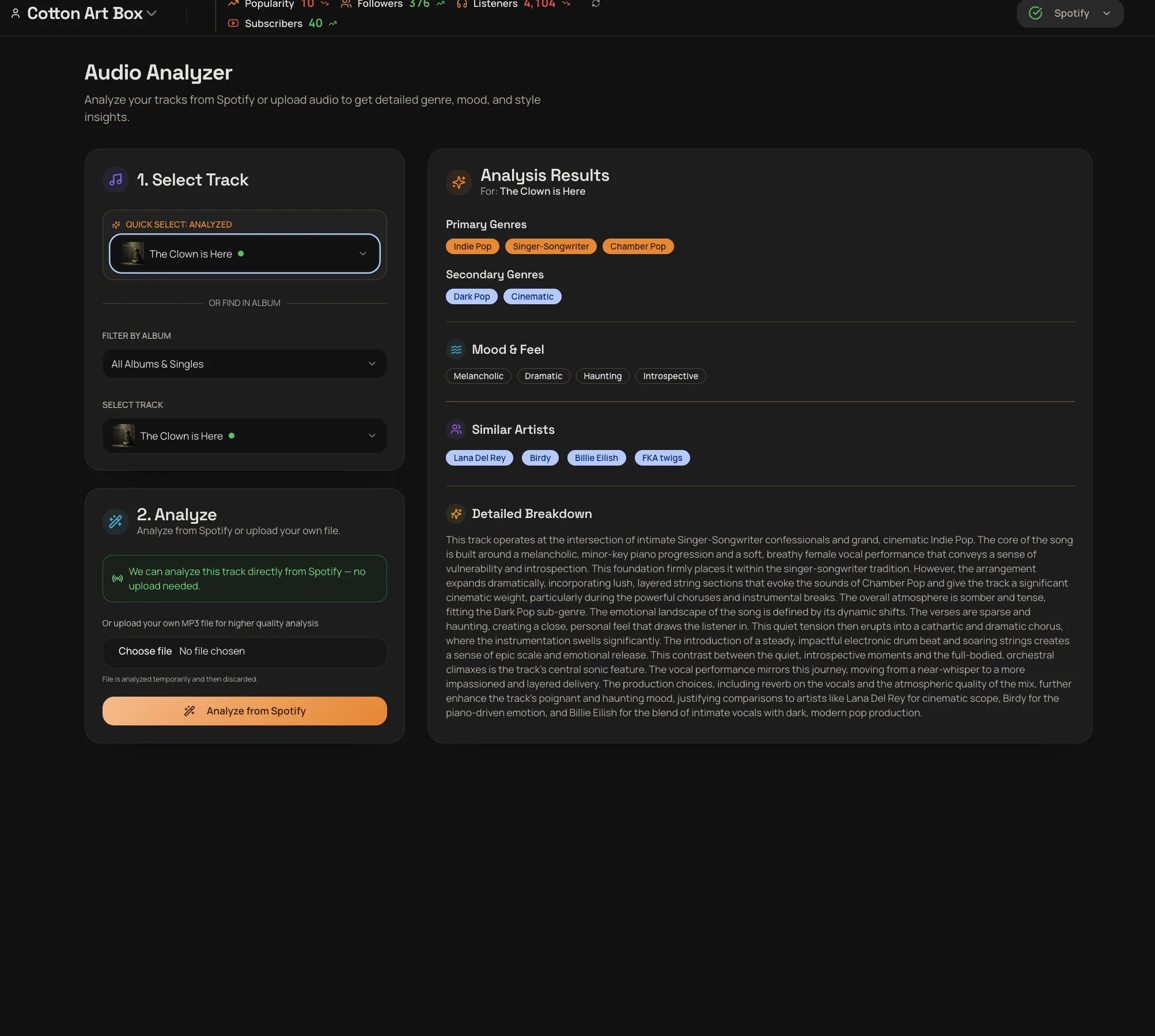
Audio Analyzer showing a track’s genres, mood, similar artists and detailed analysis.
View full size

Start with what makes your song yours.

Identify your track’s genre, mood and themes, then use those insights to shape its promotion.

Existing product screens from Cotton Art Box, our founder's artist project. Shown to demonstrate the workflow, not campaign results.

Private beta access

Be ready for your next release.

Leave your email and we’ll let you know when a place opens. Joining the waitlist is free and does not start your trial.

We’ll use this email to contact you about access. Privacy policy

Your everyday artist workspace

Less busywork. More time for music.

From the next social post to the next release, keep your music, creative work and publishing together. Start with the tools you need and build from there.

01 / Socials

Your next post. Your whole release. Ready to publish.

Write, schedule and publish social posts from the same place you manage your music. Turn your song’s story into editable captions, pair them with your artwork or video, and choose when they go live.

  • Make it right for each platform.Review the caption, media and post format for each connected account.
  • Publish now or get ahead.Send posts directly, choose a time or use automatic scheduling.
  • Plan weeks of content together.Monthly Campaigns build a content plan you can review, edit and schedule around your release.
  • Instagram
  • Facebook
  • TikTok
  • YouTube
  • X

Available post formats depend on your connected accounts and media. Monthly Campaigns require a plan that includes them.

Explore Socials
Socials workspace with editable platform captions and controls to publish now or schedule posts.View full size
Socials in use with Cotton Art Box, our founder’s artist project.

Prepare your posts together, then let the schedule do the publishing.

02 / Video Studio

Turn your tracks into videos.

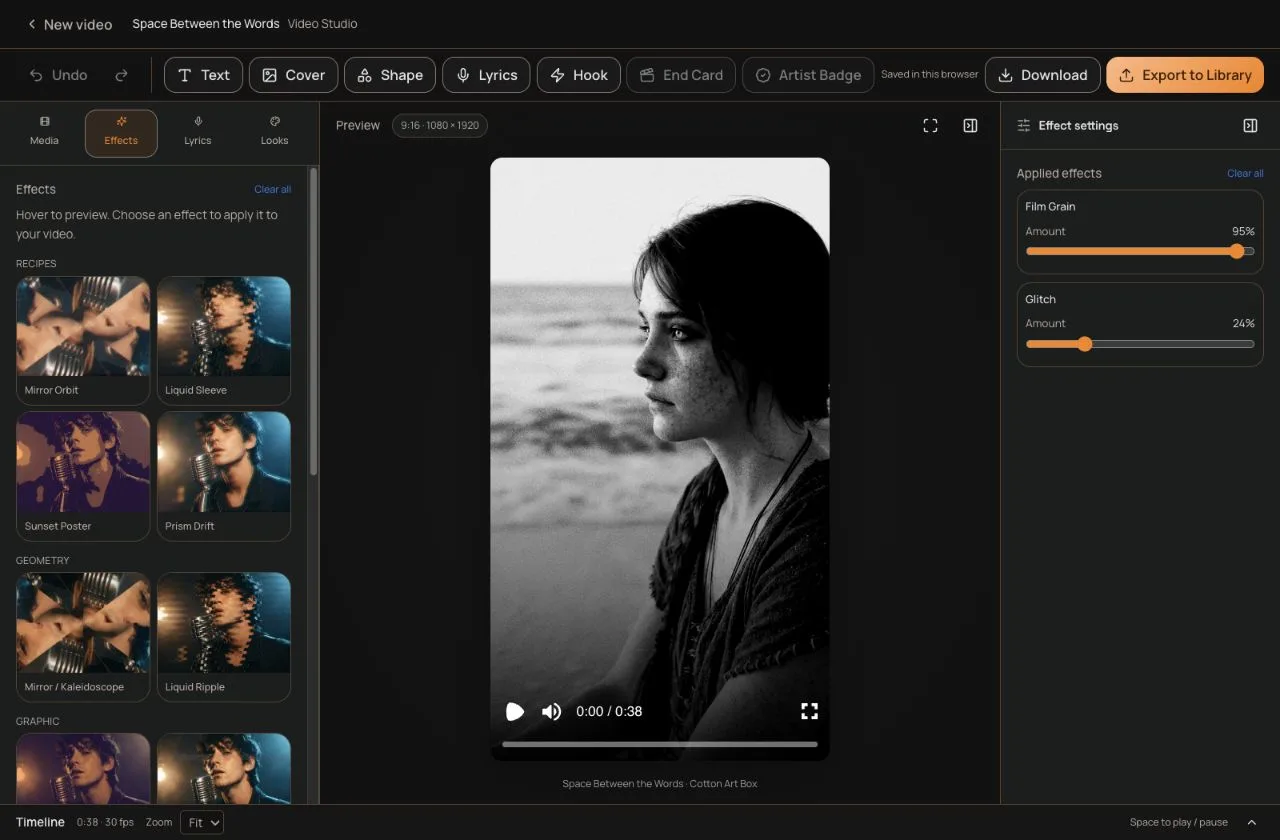
Build promotional clips, lyric videos and looping Spotify Canvases in your browser. Start with your own footage, or generate an Auto Clip from a section of your track and make it your own in the editor.

  • Shape the clip around your track.Arrange footage on a timeline, add text and artwork, and edit lyrics and their timing.
  • Make the look your own.Use visual effects and animated typography to give your vertical video its own look.
  • Keep creating from what you make.Download an MP4 or export to your Media Library, ready to select for a social post or ad campaign.

Video Studio requires a plan that includes it. Auto Clip generation has separate plan access.

Explore Video Studio
Video Studio showing a vertical music video preview, effects library, text and lyrics tools, and download and Media Library export controls.View full size
An existing Cotton Art Box video draft in Video Studio.
  • Promo clips
  • Lyric videos
  • Spotify Canvas

Give your release everything it needs.

Create the artwork, reach new listeners and give fans a way to stay connected.

03

Create artwork that fits your sound.

Use your track’s mood, lyrics and story to develop images and storyboard scenes in Visual Designer. Keep your artwork and clips in the Media Library, ready for your next post or campaign.

Visual Designer · Sonic analysis · Media Library

See how it works
04

Promote the release.

Choose your media, audience and budget for Facebook and Instagram ads. Review the campaign before launch and see delivery and landing-page activity in one place.

Meta ads · Campaign reporting · Smart links

See how it works
05

Fast fan pages for your ads.

Your ad earns a moment of attention. Send fans to a lightweight page built for phones, with clear Spotify, Apple Music and other streaming buttons that make the next step easy to find.

Fast Mode smart links · Streaming choices · Visit-to-click reporting

See how it works
06

Keep the connection.

Give fans a reason to leave their email: an exclusive download, a bonus video or a release notification. Organize your subscribers and send your next update directly from IndieRocket.

Fan Gates · Subscribers · Email campaigns

See how it works

You make the creative and spending decisions. Edit the drafts, choose your media and review the campaign before launch. Reports keep ad delivery, page visits, service clicks and email submissions distinct.

Bot Shield / Streaming health

Your music deserves real listeners.

Spot the warning signs of bot streams. Bot Shield flags suspicious streaming spikes and gives you the evidence to investigate potential artificial activity around your music.

Keep stream monitoring alongside the tools you use to grow. Your promotion activity helps put each warning in context, so you can follow up on suspicious playlists with a clearer picture.

Explore Bot Shield

Included on eligible plans; monitoring needs enough history to build a baseline. Alerts flag concerns for review. Bot Shield does not block streams or remove tracks from playlists.

  1. Know when a spike needs attention.

    Bot Shield watches for unusual changes against your tracks’ streaming history. Confirmed spikes trigger an in-app alert and email, so you know what to review.

  2. See the evidence in context.

    Compare the spike with your usual streaming pattern and the campaigns, posts, smart links and Fan Gates IndieRocket knows about. Understand what changed before deciding what to do.

  3. Investigate with something to go on.

    Check the finding in Spotify for Artists. If the concern holds up, follow the link to report a suspicious playlist or copy the incident summary for your distributor.

Present, organize & understand

Build your artist career between releases.

Your press kit, next booking, playlist opportunities and release performance belong in your everyday workspace. Give each part of your artist life the same attention as your next campaign.

07

EPKs & technical riders

Be ready when a venue, promoter or journalist asks.

Bring your music, story, photos and live setup into a shareable press kit. Create different links for different opportunities while keeping your artist content together.

  • Customizable press kit pages
  • Press assets & technical riders
  • Branded share links & custom domains
Explore the EPK builder
08

Bookings & availability

Take the next gig from enquiry to calendar.

Let venues request a booking from your press kit. Keep incoming requests, available dates and confirmed shows in one place, with your calendar close at hand.

  • Booking requests from your EPK
  • Availability & gig calendar
  • Google & Apple calendar subscriptions
Explore the booking workflow
09

Release & audience intelligence

See the bigger picture behind your next move.

Follow your tracks’ streaming trends, popularity and audience activity alongside your promotion reports. Use that context to decide which release needs your attention next.

  • Artist & track performance
  • Audience & campaign reporting
  • Streaming trends over time
Explore release analytics
10

Playlist discovery & pitch tools

Find opportunities for the music you are making.

Search for playlists, follow discovered placements and organize your playlist library. Use your song’s sound and story to prepare an editable Spotify editorial pitch draft.

  • Playlist search & placement tracking
  • An organized playlist library
  • Spotify pitch drafts you can edit
Explore playlist tools

One artist profile connects the work. Compare the plans below for included tools and monthly allowances.

One subscription. Your artist workspace.

Choose the tools for your next chapter.

Social publishing, video creation, promotion and the day-to-day work of being an artist. See exactly what each plan brings together.

Private beta: join the waitlist for access. No payment is collected here.

Free

Free

Up to 1 artist

Meta ads management not included

Create & publish

  • Socials: captions, publishing & scheduling

Promote & connect

  • Fan Gates & email capture

Collect subscribers; email sending requires a paid plan.

Manage your artist career

  • Release & audience analytics
  • Booking calendar & availability
Join the waitlist

Starter

$15 USD / month

Up to 1 artist

Meta ads management not included

Create & publish

  • Socials: captions, publishing & scheduling
  • Sonic track analysis

Promote & connect

  • Fast smart links & share pages
  • Fan Gates & email capture
  • 500 email sends per 30 days

Manage your artist career

  • Release & audience analytics
  • Playlist discovery & tracking
  • Booking calendar & availability
Join the waitlist

Pro

Recommended

$30 USD / month

Up to 10 artists

Meta ads management included. Ad spend is separate.

Create & publish

  • Socials: captions, publishing & scheduling
  • Sonic track analysis
  • Monthly content campaigns
  • Video Studio
  • Auto Clip generation
  • Visual Designer
  • 90 generated images per 30 days

Promote & connect

  • Facebook & Instagram ads
  • Fast smart links & share pages
  • Fan Gates & email capture
  • 2,500 email sends per 30 days

Manage your artist career

  • Release & audience analytics
  • EPKs, tech riders & booking requests
  • Playlist discovery & tracking
  • Spotify pitch drafts
  • Bot Shield stream monitoring
  • Booking calendar & availability
Join the waitlist
Compare tools by plan

Swipe or scroll sideways to compare plans.

Features available on each current IndieRocket plan
FeatureFreeStarterPro
Facebook & Instagram adsNot includedNot includedIncluded
Socials: captions, publishing & schedulingIncludedIncludedIncluded
Sonic track analysisNot includedIncludedIncluded
Monthly content campaignsNot includedNot includedIncluded
Video StudioNot includedNot includedIncluded
Auto Clip generationNot includedNot includedIncluded
Visual DesignerNot includedNot includedIncluded
Fast smart links & share pagesNot includedIncludedIncluded
Release & audience analyticsIncludedIncludedIncluded
EPKs, tech riders & booking requestsNot includedNot includedIncluded
Playlist discovery & trackingNot includedIncludedIncluded
Spotify pitch draftsNot includedNot includedIncluded
Bot Shield stream monitoringNot includedNot includedIncluded

Advertising spend is paid separately to Meta. Monthly image and email allowances reset on a rolling 30-day period. Trial limits are separate. Choose your subscription inside the app once you have access.

Before you start.

Why choose IndieRocket over Hypeddit or another music promotion tool?

Choose IndieRocket for the whole artist workflow: make the content, publish it, promote the release, stay in touch with fans and organize the next opportunity. Your music, media and artist profile connect the work in one place.

Hypeddit’s published toolkit emphasizes music ads, smart links, gates and fan insights. IndieRocket brings those promotion essentials together with hands-on video creation, social publishing, Bot Shield stream monitoring and the everyday tools around your artist career.

  • Socials that do the postingDraft captions, choose your media, then publish or schedule to connected Instagram, Facebook, TikTok, YouTube and X accounts. Prepare weeks of release content with Monthly Campaigns.
  • A video studio built around your musicMake vertical promo clips, lyric videos and Spotify Canvases. Use Auto Clip generation, edit footage and lyric timing, add effects, then export an MP4 or save to your Media Library.
  • Creative direction from your own soundAnalyze genre, mood and themes. Use that song context for captions, artwork and storyboard scenes in Visual Designer, and reuse your assets across releases.
  • Ads and the pages fans land onManage Facebook and Instagram campaigns alongside fast mobile smart links, streaming-service buttons and reporting that separates ad delivery, page visits and service clicks.
  • Fan relationships you can keep buildingOffer downloads or bonus content through Fan Gates, collect subscribers, send email campaigns and let fans opt into future-release notifications.
  • A professional home for your artist careerBuild EPKs with press assets and technical riders, create branded share links and custom domains, and manage booking requests, availability and your gig calendar.
  • Bot Shield for suspicious streaming activityWatch for possible bot activity with stream monitoring, confirmed-spike alerts and incident evidence. Compare unusual changes with your own promotion, then verify concerns in Spotify for Artists and use the reporting link or distributor summary to follow up. Alerts are not proof of bots; Bot Shield does not block streams or remove tracks from playlists.
  • Release intelligence and playlist opportunitiesFollow artist and track trends, explore audience analytics, discover playlists, track placements and prepare editable Spotify editorial pitch drafts.

Features and allowances depend on your plan. Social formats depend on the connected account and media; Video Studio and Auto Clip have separate access. Ad spend is paid separately to Meta. Compare tools by plan

Built for the tap after your Meta ad.

The moment after an ad click matters. IndieRocket’s Fast Mode smart links are built for phones, with lightweight pages and a clear next step to your music.

IndieRocket and the Hypeddit page tested · 2 September 2026

First visible content (FCP)
2.03 s vs 4.04 s
IndieRocket · Hypeddit page tested
Data transferred in this sample
About 95% less
328 KiB · 6,353 KiB
IndieRocket · Hypeddit page tested

Medians of five runs per page, using different releases and simulated mobile conditions. This is a dated sample of those pages, not every site or phone, and does not measure conversion improvement.

See all ten pages and the test conditions

Lighthouse 13.4.1, Chrome 152.0.0.0; 412 × 823 mobile emulation, 150 ms simulated latency, 1,638.4 Kbps throughput and 4× CPU slowdown. One discarded warm-up and five fresh-storage runs per page, tested serially in an interleaved order on 2 September 2026. One location, recorded as “ewr” by the operator.

These were different releases and page designs. The IndieRocket page used Meta-ad Fast Mode and a verified warm cache. Known analytics collectors were blocked; some tracking configuration and loader work was excluded. This measures page rendering, not a real Instagram in-app-browser journey.

FCP is first visible content; LCP is the largest visible content element. Neither is a completed stream, a conversion rate or a guarantee for a real phone. Feature.fm and found.ee had lower median LCP than IndieRocket in this sample.

2 September 2026 · Five-run medians per tested page
Tested pageFirst content (FCP)Largest content (LCP)Data transferred
IndieRocket2.03 s3.64 s328 KiB
Feature.fm1.07 s2.79 s457 KiB
found.ee2.87 s3.09 s441 KiB
Soundplate Clicks2.55 s3.92 s1,720 KiB
ArtistHub0.88 s4.45 s499 KiB
Linkfire2.64 s6.25 s1,717 KiB
DistroKid HyperFollow4.50 s6.23 s2,665 KiB
PUSH.fm3.52 s11.85 s1,429 KiB
ToneDen FanLink23.45 s26.35 s4,643 KiB
Hypeddit4.04 s34.06 s6,353 KiB
Download all samples and page-specific test notes (JSON)

Competitor feature scope checked against Hypeddit’s published feature list on 6 September 2026. The difference is the combined workflow; individual features may also be offered elsewhere.
Can I start using IndieRocket today?

IndieRocket is in private beta. Join the waitlist and we’ll email you when access is available. Existing users and invited artists can sign in; joining the list does not create an account or start a trial.

What is included in the trial?

The standard trial gives new artists 15 days on Pro, with no credit card required. It includes 15 generated images and 50 email sends across the whole trial, subject to that plan’s feature access. Invite or promotional terms may differ. The trial starts when you create your account after receiving access, not when you join the waitlist.

Can I publish to social media from IndieRocket?

Yes. Connect your artist’s Facebook, Instagram, TikTok, YouTube or X accounts in Socials. Review your captions and media, then publish now or schedule posts. Available formats depend on the platform, account and media. Plans with Monthly Campaigns let you prepare, review and schedule weeks of release content together.

What can I make in Video Studio?

Create promotional clips, lyric videos and looping Spotify Canvases. Edit footage, text, artwork, effects and lyric timing in your browser, then download an MP4 or export to your Media Library for use in posts and campaigns. Video Studio and Auto Clip generation have their own plan access; check the plan comparison for details.

How does Bot Shield help protect my music?

Bot Shield monitors streaming patterns for signs of possible bot activity. Once enough streaming history establishes a baseline, it flags unusual spikes and checks them against another data source before issuing an urgent in-app alert and email. Review the change alongside your known campaigns, posts, smart links and Fan Gates, then check Spotify for Artists. If that evidence supports a concern, use the Spotify playlist-reporting link or copy an incident summary for your distributor. Available on plans that include Bot Shield. An alert is a signal to investigate, not proof of bots: Bot Shield does not block streams, identify every suspicious playlist or remove tracks from playlists.

Is the advertising budget included?

No. The IndieRocket subscription covers the tools in your plan. Meta ad management is available on Pro. Your ad spend is paid separately to Meta through your connected ad account. You choose the campaign budget and review the launch.

What do I need to run ads?

You need a plan with Meta ads, a Facebook Page and an eligible Meta ad account with a payment method. The setup flow walks you through the required permissions. Available placements and campaign options depend on your connected accounts.

Does IndieRocket guarantee streams or followers?

No. Results depend on your music, creative, audience and budget. Reports distinguish Meta delivery, landing-page visits, service clicks and email submissions. A click to Spotify is not a confirmed stream.

Do pre-saves automatically save a track on Spotify?

IndieRocket’s built-in pre-save pages collect email signups for release notifications. Fans can also opt into notifications about future releases. These pages do not automatically save music to a fan’s Spotify library. Some Fan Gate actions use a fan’s confirmation rather than provider verification.

What happens after my trial?

Choose an available subscription inside the app to continue with its features and allowances. The free plan includes fewer tools. There is no automatic charge without starting a paid subscription.

Give your next release a plan.

Join the private beta waitlist. We’ll email you when access is available.

Join the waitlist